S4 Downloads

PatrolSafe for Windows.

Download the verified PatrolSafe v1.0.3 Windows application free by secure email. No card is required, and the installer includes a 30-day trial.

PatrolSafe by S4

Version 1.0.3
Platform
Windows 11 x64
Publisher
Vesoft Services Limited
Installer size
185.1 MB
Free download · 30-day trial

PatrolSafe for Windows

Download free. Evaluate for 30 days.

Get the signed Windows installer free with no card required. Purchase the £299 total including VAT annual licence only if you choose to continue after the trial.

Verified Windows release

PatrolSafe by S4

Version 1.0.3

This signed production release is available as a free Windows download with a 30-day trial. No payment card is required.

Certified platform
Windows 11 x64
Build
2026.09.30.23.24.51
Architecture
Windows x64
Publisher
Vesoft Services Limited
Installer
PatrolSafe-v1.0.3-x64-setup.exe
Size
185.1 MB (185,106,400 bytes)
Digital signature
Valid and Microsoft-timestamped
Release status
Published · storage verified
SHA-256
0F7280E857736A93D07764ED5B78B673F746CCBC6440ED419E0BAC436326397F
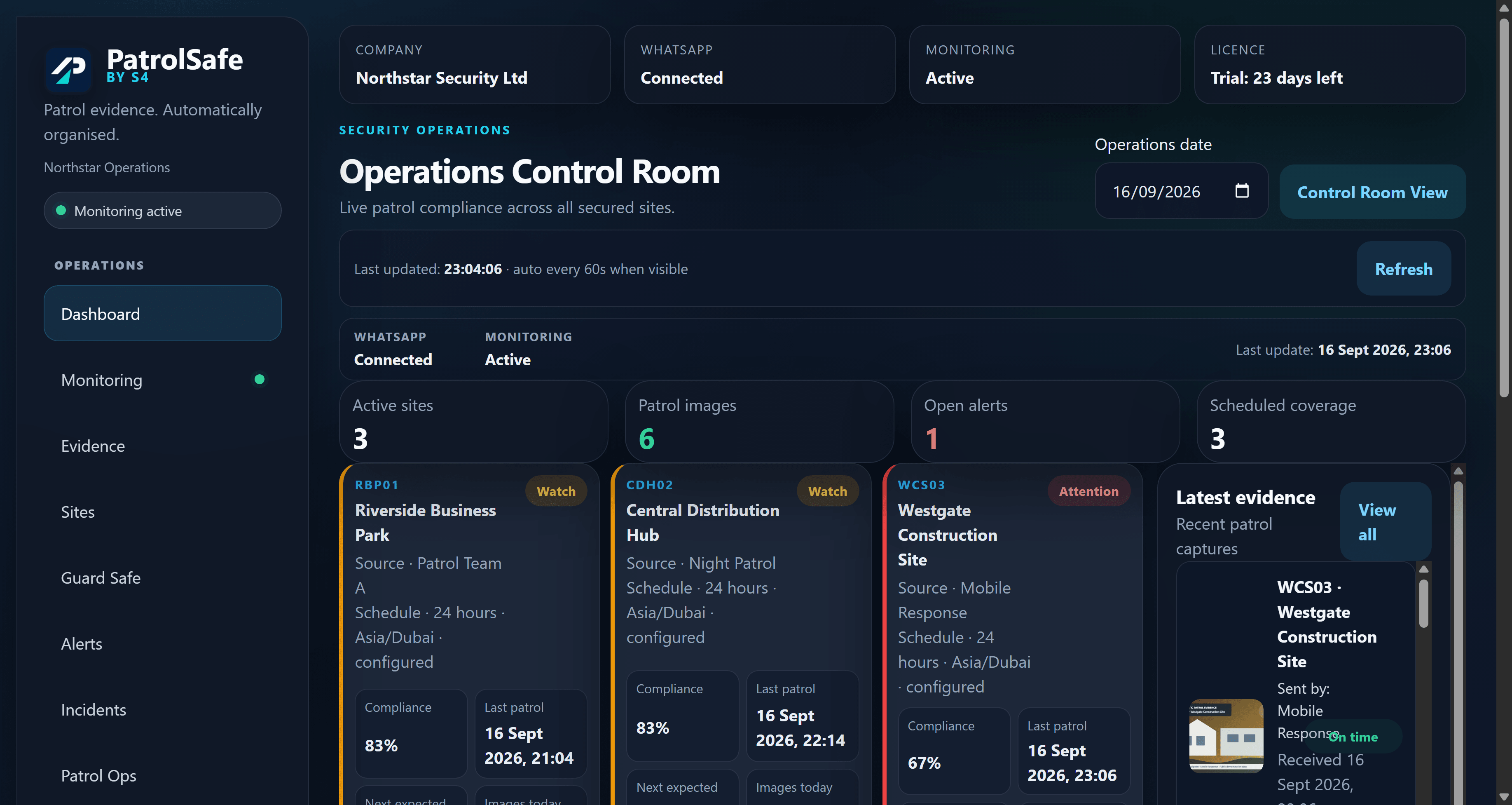
PatrolSafe operations dashboard showing synthetic site and patrol activity.
PatrolSafe v1.0.3 operations dashboard using a publication-reviewed synthetic workspace.

Verify your download

Compare the installer before opening it.

SHA-256 is a file fingerprint. After downloading, calculate the checksum of the downloaded installer and compare it with the complete value below. Also confirm that Windows reports a valid digital signature from Vesoft Services Limited.

Stop and contact support if the checksum, filename, publisher, or signature does not match.

SHA-256 · PatrolSafe v1.0.30F7280E857736A93D07764ED5B78B673F746CCBC6440ED419E0BAC436326397F
File
PatrolSafe-v1.0.3-x64-setup.exe
Signature
Valid and Microsoft-timestamped

The complete checksum remains published here so you can verify the installer delivered through the email-gated acquisition route.

System requirements

Certified for Windows 11 x64.

Only the verified v1.0.3 customer environment is presented here.

Operating system
Windows 11 x64
Browser dependency
Current supported Microsoft Edge
Connectivity
Reliable outbound HTTPS/WebSocket access to WhatsApp Web
Account
An eligible, authorised WhatsApp account with linked-device capability

Installation overview

Install from the verified release.

This overview follows the supported setup sequence. Use the public getting-started guide for complete preparation and first-run checks.

  1. 01

    Download free

    Use the S4 downloads page to request the authorised PatrolSafe release free. No payment card is required.

  2. 02

    Verify the installer

    Compare its SHA-256 and confirm the Windows digital signature names Vesoft Services Limited.

  3. 03

    Run the installer

    Open the signed Windows installer without disabling Defender or SmartScreen.

  4. 04

    Create the workspace

    Complete first-run setup, review the workspace time zone, and choose appropriate evidence storage.

  5. 05

    Connect the authorised account

    Use the WhatsApp linked-device flow and wait for the application to report the connection state.

  6. 06

    Configure operations

    Create sites, map approved groups, check the mappings, and then start monitoring.

Read the PatrolSafe getting-started guide

Release information

Version 1.0.3

This published release maintains PatrolSafe's certified Windows 11 x64 environment and existing workspace time-zone, evidence, monitoring, and backup/restore compatibility.

Release
Published
Storage
Verified · go
Website acquisition
Free secure-email download available
Public release notes
Read v1.0.3 release notes

Need assistance?

Get help with PatrolSafe.

Contact S4 support for release verification, installation, or PatrolSafe product assistance. Do not send patrol evidence or sensitive workspace data by ordinary email.