

Configured group monitoring
Select approved groups by display name, map them to sites, and control monitoring from the desktop app.
PatrolSafe by S4
PatrolSafe is a Windows desktop application that captures patrol images from approved WhatsApp groups and organises them into searchable site records. Download free and evaluate the 30-day trial with no card required.
Built for patrol operations
PatrolSafe is designed for security-company administrators and operations teams that need to turn newly received patrol images into structured records without manually sorting site folders.
Try PatrolSafe
The download and 30-day trial are free. Buy an annual licence from PatrolSafe only if you want to continue after the trial.
Request the current signed Windows installer. No payment card is required.
Verify the published checksum and install the signed Windows application.
Evaluate PatrolSafe with your authorised groups and operational setup.
If you choose to continue, buy the £299 total including VAT PatrolSafe Annual Licence from the application. It covers one Windows workstation for 12 months with no automatic renewal.
How PatrolSafe works
A focused workflow for collecting supported patrol images and making them easier to locate by site.
Your organisation continues using the patrol groups it has approved for operational use.
PatrolSafe collects newly received supported patrol images through the configured integration.
Configured group mappings route incoming evidence into structured site records.
Operations teams can review evidence using site, date, time, and source context.
Product capabilities
Verified desktop capabilities for configuring sources, organising records, and maintaining the workspace.
Select approved groups by display name, map them to sites, and control monitoring from the desktop app.
Collect newly received supported JPEG and PNG patrol images while monitoring is active.
Keep future evidence associated with the site selected for each configured group mapping.
Review patrol images with site, date, time, source, and integrity context in gallery or timeline views.
See WhatsApp connection and monitoring status separately, including connected and paused states.
Create and restore verified local workspace backups through the application settings.
Product gallery
Explore the real PatrolSafe v1.0.3 interface using a publication-reviewed synthetic workspace.
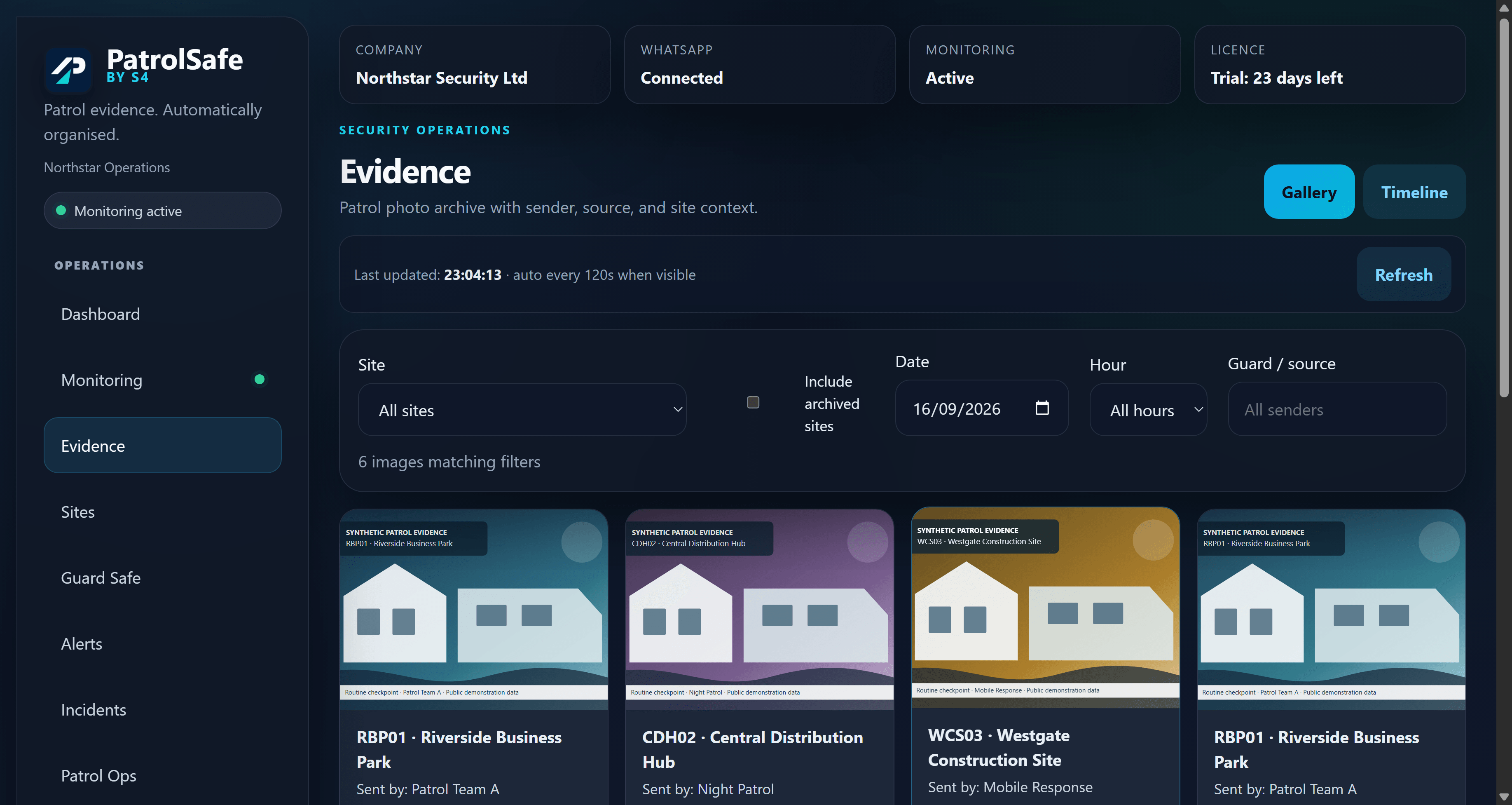
Review organised patrol images using site, date, hour, and source filters.
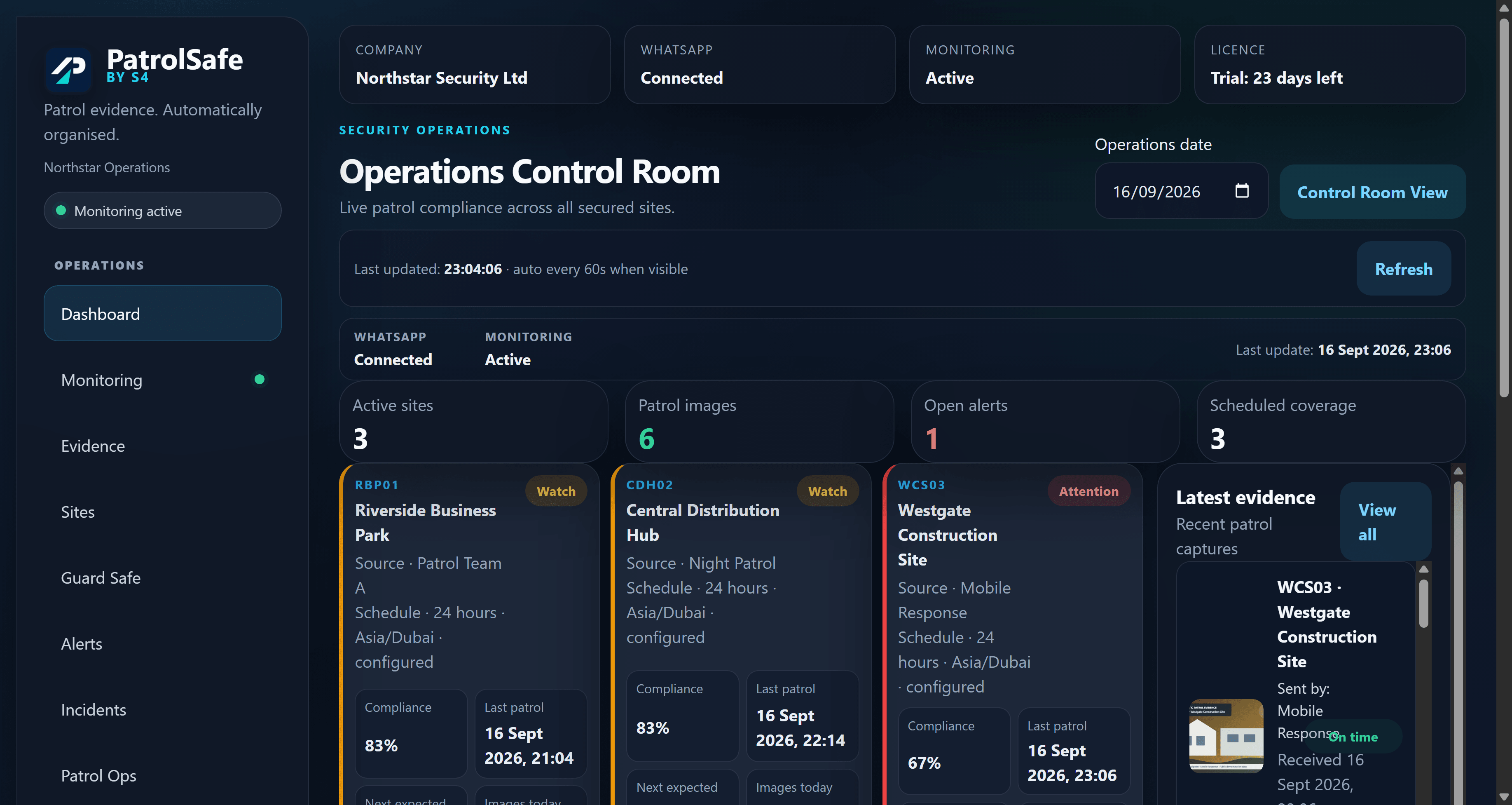
A clear operational view of connection, monitoring, sites, and evidence activity.
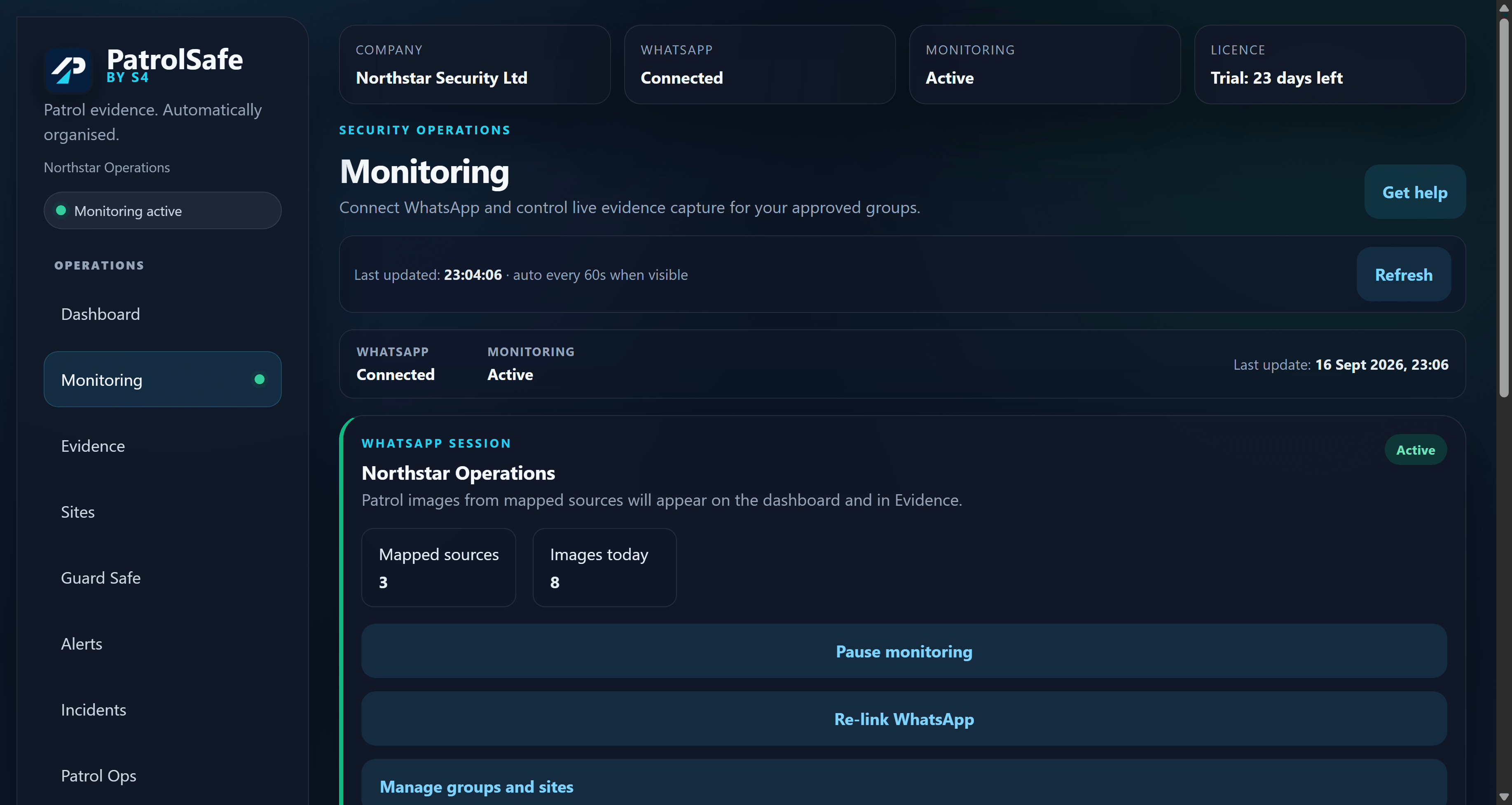
See WhatsApp connection and monitoring state separately in the operational workspace.
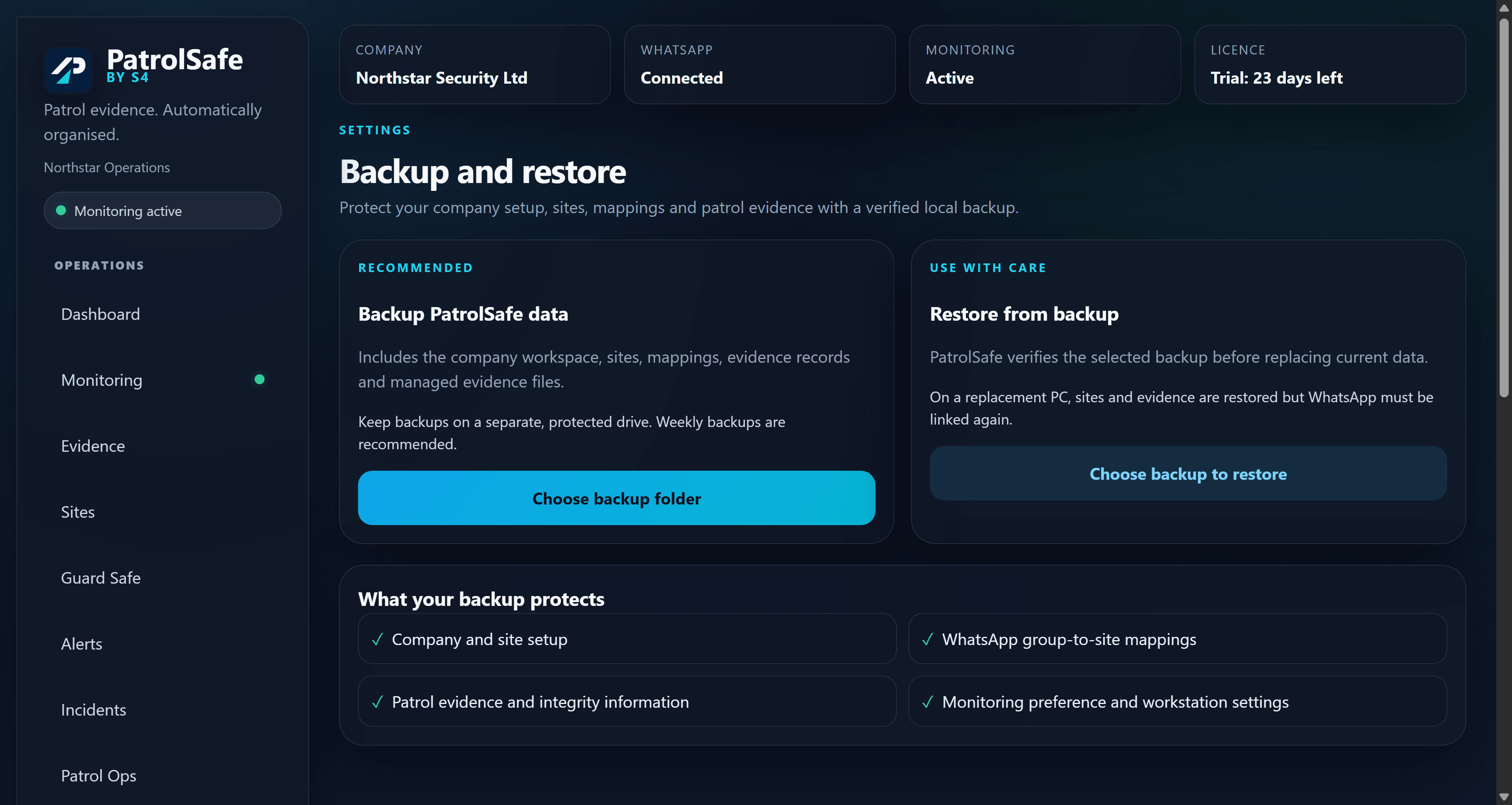
Create and restore verified workspace backups through application settings.
Release trust
The production release is versioned, digitally signed, and accompanied by a published integrity checksum.
Verify your download
A SHA-256 checksum is a file fingerprint. After downloading, compare the downloaded installer with the published value on the downloads page and confirm the Windows signature names Vesoft Services Limited.
View verification informationData handling
PatrolSafe works with records that can contain personal and security-sensitive information.
The operational database and evidence are stored on the customer's workstation or selected storage for the PatrolSafe workspace.
Organisations remain responsible for source authorisation, access control, retention, backup destinations, disclosure, and lawful use.
Backups can contain evidence and account material. Store them on protected, access-controlled storage and contact support before sharing diagnostic or recovery data.
System requirements
PatrolSafe depends on a supported Windows environment and the third-party services used for its configured integration.
Installation overview
This concise sequence reflects the supported setup guidance. The public getting-started guide provides the complete preparation and first-run checks.
Use the S4 downloads page to request the authorised PatrolSafe release free. No payment card is required.
Compare its SHA-256 and confirm the Windows digital signature names Vesoft Services Limited.
Open the signed Windows installer without disabling Defender or SmartScreen.
Complete first-run setup, review the workspace time zone, and choose appropriate evidence storage.
Use the WhatsApp linked-device flow and wait for the application to report the connection state.
Create sites, map approved groups, check the mappings, and then start monitoring.
Release information
Version 1.0.3 is the published Windows production release. It maintains the certified Windows 11 x64 environment and the existing evidence, monitoring, workspace time-zone, and backup/restore compatibility.
Download the current release free, then verify the installer before starting the 30-day trial.
Frequently asked questions
Product, platform, verification, and support information for v1.0.3.
PatrolSafe is a Windows desktop application that captures newly received supported patrol images from approved WhatsApp groups and organises them into searchable site records.
An authorised account is connected through the linked-device capability. Administrators select approved groups, map them to sites, and start monitoring so supported new images can be organised into the appropriate site record.
No. Teams continue using their approved groups. PatrolSafe provides the Windows workspace used to configure monitoring and review organised patrol evidence.
PatrolSafe v1.0.3 is certified for Windows 11 x64.
Configured group mappings associate future supported images with a site. Evidence can then be reviewed using site, date, time, and source context.
Compare the installer's SHA-256 with the value published on the downloads page, then check that Windows reports a valid digital signature from Vesoft Services Limited.
Yes. Download and install the Windows application free with no payment card required, then use the 30-day trial. If you choose to continue, the PatrolSafe Annual Licence costs £299 total including VAT for one Windows workstation for 12 months and does not renew automatically.
Visit the S4 support page or email support@sfour.co.uk for PatrolSafe product assistance.
Versioned release information is published through the S4 downloads experience. Contact support if you need help confirming the appropriate release for your installation.
PatrolSafe support
Download the verified Windows release free with no card required, or contact support if you need help with PatrolSafe.